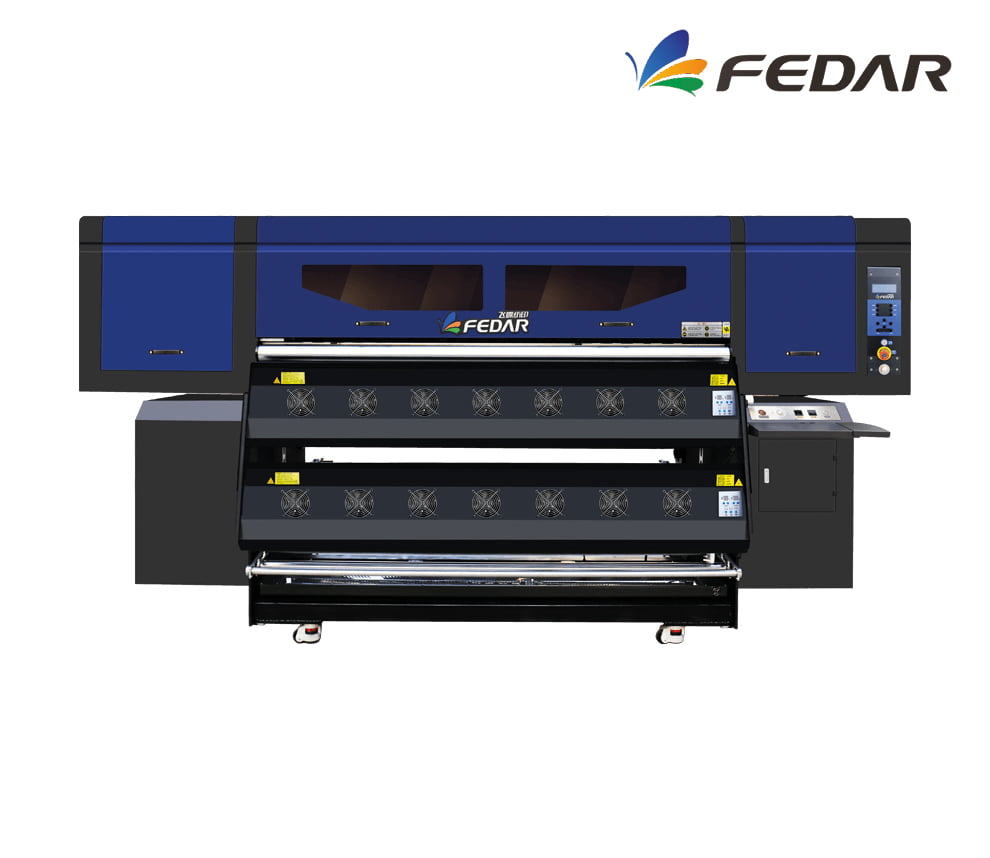
8 cabezales Epson I3200
Plotter FD6198E
Descripción
Description
Specifications:
Printhead: 8*Epson I3200-A1
Printhead Resolution: 3200 DPI
Print Speed: 320 m²/h
Print Width: 1900 mm
Ink: Dye-sublimation ink
Media: Sublimation transfer paper
RIP Software: Photoprint, Inedit
Textile/Rigid Material Compatibility:
100% Polyester
Microfiber
Dry-fit/Sportswear Fabrics
Microtulle/Lycra
Synthetic fabrics with high polyester content (85% or more)
Sublimation is chemically bonded to polyester, which is why it works best on polyester: vibrant colors, excellent definition, and maximum wash resistance.
- HIGH-RESOLUTION PRINTHEAD 8 Epson I3200-A1 printheads; 1-pass speed can reach up to 320 m²/h.
- SMART LOW-INK ALARM Reduces the need to frequently check remaining ink levels and reminds you to add ink in time to ensure continuous printing workflow.
- STABLE MEDIA FEEDING AND TAKE-UP SYSTEM Convenient and fast; media is quickly loaded, equipped with automatic paper measurement and anti-scratch function. If the consumables deform, printing stops automatically to prevent head strikes.
- ADVANCED CAPPING STATION Equipped with an advanced intelligent printhead cleaning and moisturizing system, providing safe and convenient maintenance and cleaning functions with simpler operation.
- SPECIALLY DESIGNED CARRIAGE The printhead position can be adjusted according to different printing media, with anti-collision devices on both sides.
- SMART HOT-AIR DRYER The intelligent drying system is synchronized with printing. Temperature can be adjusted in real-time during the printing process.
- FLUORORUBBER PRESSURE ROLLER The U.S. fluororubber pressure roller prevents static electricity. The exclusive lifting device compensates for partial paper bulging during the printing process.
- HIGH-PRECISION PLATFORM The printing platform is controlled within ±7.5 wires and features hard oxidation treatment on the surface to prevent long-term deformation.
- THK SILENT GUIDE RAIL Uses Japanese THK silent linear guide rail for smoother movement and longer service life.
- LEADSHINE SERVO MOTOR The bidirectional brushless Leadshine motor offers higher precision, lower length deviation, and more stable performance.
- LARGE-CAPACITY INK TANKS Four 3L large-capacity ink tanks supply ink independently and continuously.
- IGUS INK CHAIN FROM GERMANY High-quality IGUS ink chain imported from Germany, ensuring excellent printing performance.
- COMPATIBILITY Win 7 / Win 8 / Win 10.
- Daily power-on (even if you don't print) Helps the inks circulate and prevents bubbles from forming or drying out in the heads.
- Automatic cleaning activated Let the equipment do its maintenance cycle. Do not interrupt it: it prolongs the life of the head.
- Keep the capping station, dampers, and wiper clean These consumables accumulate ink and lint. A weekly cleaning prevents stains and clogs.
- Control the ambient humidity Ideal: 45%–60%. Low humidity dries the ink; high humidity generates droplets on the paper.
- Check feed rollers and trays If they are dirty, they mark the paper or generate banding.
- Use the equipment at least 3–4 times per week Sublimation plotters need constant ink movement.
Related Products
-
6 cabezales Epson I3200
- High Speed 6-printhead design; maximum achievable speed is 32 m²/h.
- White-Ink Circulation System Prevents white-ink clogging and ensures more stable printing.
- Robust Body Japanese steel guide rail; integrated high-strength stand.
- Built-in Air Purifier Powder agitator with fume-purification function, electronic cleaner, and oil-fume separation.
- Intelligent Printhead Plate Heating The head heats automatically according to temperature to achieve uniform printing.
- Smart Touchscreen Easier operation thanks to the touch control panel.
Compatibility: Standard PhotoPrint and others.
Maintenance- Dust-Free Environment Keep the work environment dust-free to prevent it from affecting printing.
- Temperature and Humidity The machine should operate at a temperature of **25-30°C** and with a humidity of **40-60%**.
- Platform Cleaning Keep the entire printer tidy and clean, removing dust from friction areas.
- Cleaning the Underside of the Printhead Move the carriage to the cleaning position, clean the underside of the printhead with a **non-woven cloth dampened with cleaning fluid or distilled water**, removing dirt from the printhead and surrounding areas.
Max width: 600mmSpeed: 36 m2/hMedia: Pet film 600Request a quote -
2 cabezales Epson I3200Maintenance
- Dust-Free Environment Keep the work environment dust-free to prevent it from affecting printing.
- Temperature and Humidity The machine should operate at a temperature of 25–30°C and a humidity of 40–60%.
- Platform Cleaning Keep the entire printer tidy and clean, removing dust from friction areas.
- Cleaning the Underside of the Printhead Move the carriage to the cleaning position, clean the underside of the printhead with a non-woven cloth dampened with cleaning fluid or distilled water, removing dirt from the printhead and surrounding areas.
Max width: 600mmSpeed: 9 m2/hMedia: Pet Film 620mmRequest a quote -
4 cabezales Epson I3200Maintenance
- Dust-Free Environment Keep the work environment dust-free to prevent it from affecting printing.
- Temperature and Humidity The machine should operate at a temperature of 25–30°C and a humidity of 40–60%.
- Platform Cleaning Keep the entire printer tidy and clean, removing dust from friction areas.
- Cleaning the Underside of the Printhead Move the carriage to the cleaning position, clean the underside of the printhead with a non-woven cloth dampened with cleaning fluid or distilled water, removing dirt from the printhead and surrounding areas.
Max width: 600mmSpeed: 23 m2/hMedia: Pet Film 620mmRequest a quote -
15 cabezales Epson I3200
- PRINTER 15 heads
- PRINTING SPEED 1 pass 610 m²/h
- PRINT WIDTH 1900 mm
- COMPATIBLE MEDIA Heat transfer paper
- COMPATIBILITY Win 7 (64 bit) / Win 10 (64 bit)
-
- Daily power-on (even if you don't print) Helps the inks circulate and prevents bubbles from forming or drying out in the heads.
- Automatic cleaning activated Let the equipment do its maintenance cycle. Do not interrupt it: it prolongs the life of the head.
- Keep the capping station, dampers, and wiper clean These consumables accumulate ink and lint. A weekly cleaning prevents stains and clogs.
- Control the ambient humidity Ideal: 45%–60%. Low humidity dries the ink; high humidity generates droplets on the paper.
- Check feed rollers and trays If they are dirty, they mark the paper or generate banding.
- Use the equipment at least 3–4 times per week Sublimation plotters need constant ink movement.
Max width: 1900mmSpeed: 610 m²/hMedia: Thermal Transfer PaperRequest a quote