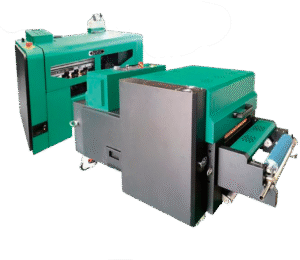
Plotter UV 3040
Descripción
Description
Printhead: Epson 13200-U1 HD Printhead
Number of Printheads: 1
Printing Speed: 0.28 m²/h ~ 3 m²/h
Print Width:
Platform: 297 x 420 mm Drum: 230 x 420 mm
Media Thickness: 1 mm ~ 90 mm
Ink Type: Environmentally Friendly UV Curing Ink
Color Configuration: Standard: CMYK+W+V Optional: YMCK LC LM+W
RIP Software: Maintop/Flexiprint/RIIN
Printing Media: Glass, plates, various signs, crystal, PVC, acrylic, plastic leather, etc.
Photo Format: TIFF, JPEG, PDF, EPS, PNG, AI, BMP, etc.
Computer Configuration: Windows 10/64-bit System
Transmission Interface: Gigabit Ethernet port, 500GB hard drive or larger
Voltage/Rated Power: 220V 50Hz/60Hz 500W
Operating Environment: Temperature: 18°C~28°C, Humidity: 40%~60%
Machine Size/Weight: 1020*830*615mm, 114kg
Packaging Size/Weight: 1130*910*760mm, 124kg
Textile/Rigid Compatibility
Acrylic
PVC/Forex
Polycarbonate
MDF and varnished wood
Aluminum/Painted sheet metal
Glass (clean and degreased)
Rigid cardboard/Foam board
PS/PET/Rigid plastics in general
-
SPEED
0.28 m²/h - 3 m²/h -
MEDIA
Glass, plates, various signs, crystal...
- Daily Power On and Circulation Even if you're not printing, turn it on every day to circulate the UV ink and prevent it from hardening inside the printhead.
- Cleaning the Wiper, Cap Station, and Surrounding Area Do this daily. UV ink is thicker and crusts up quickly, clogging the nozzles.
- Avoid Direct Light on the Ink UV inks are cured by light. Keep the cartridges and the plotter area away from sunlight or external UV lights.
- Nozzle Check 1–2 Times a Day UV ink tends to dry faster. You detect any cuts before they affect a job.
- Manual printhead cleaning (only when necessary) Do this with UV cleaning solution and a lint-free cloth. Never use alcohol.
- Proper ventilation of the work area UV inks emit fumes. A well-ventilated environment improves the life of the equipment and the health of the operator.
Related Products
-
2 Epson I1600 printheadsMaintenance
- Dust-free environment Keep the working environment dust-free to prevent it from affecting printing.
- Temperature and humidity The machine should operate at a temperature of 25–30°C and with a humidity of 40–60%.
- Platform cleaning Keep the entire printer tidy and clean, removing dust from friction areas.
- Cleaning the bottom of the printhead Move the carriage to the cleaning position, wipe the bottom of the printhead with a non woven cloth dampened with cleaning fluid or distilled water, removing dirt from the printhead and nearby areas.
Max width: 300mmSpeed: 7.1 m2/hMedia: Pet Film 320mmRequest a quote -
1 PrecisionCore® Micro TFP® printhead
-
INK TYPE
Epson UltraChrome DS sublimation ink (4 colors). -
MAX RESOLUTION
2400 dpi x 1200 dpi. -
DIMENSIONS (W × D × H)
970 mm × 577 mm × 245 mm. -
DISPLAY
4.3-inch touchscreen LCD. -
CONNECTIVITY
High-speed USB 3.0, Wireless LAN (802.11 b/g/n), and Wired Ethernet (1000 Base-T / 100 Base-TX / 10 Base-T).
Daily power-on (even if you don't print)
Helps the inks circulate and prevents bubbles from forming or drying out in the heads.Automatic cleaning activated
Let the equipment do its maintenance cycle. Do not interrupt it: it prolongs the life of the head.Keep the capping station, dampers, and wiper clean
These consumables accumulate ink and lint. A weekly cleaning prevents stains and clogs.Control the ambient humidity
Ideal: 45%–60%. Low humidity dries the ink; high humidity generates droplets on the paper.Check feed rollers and trays
If they are dirty, they mark the paper or generate banding.Use the equipment at least 3–4 times per week
Sublimation plotters need constant ink movement.
Max width: 620 mm (24'')Speed: 62 seconds (for A1/D size)Media: Sublimation transfer paper for textiles and rigid materialsRequest a quote -
-
8 cabezales Epson I3200
- HIGH-RESOLUTION PRINTHEAD 8 Epson I3200-A1 printheads; 1-pass speed can reach up to 320 m²/h.
- SMART LOW-INK ALARM Reduces the need to frequently check remaining ink levels and reminds you to add ink in time to ensure continuous printing workflow.
- STABLE MEDIA FEEDING AND TAKE-UP SYSTEM Convenient and fast; media is quickly loaded, equipped with automatic paper measurement and anti-scratch function. If the consumables deform, printing stops automatically to prevent head strikes.
- ADVANCED CAPPING STATION Equipped with an advanced intelligent printhead cleaning and moisturizing system, providing safe and convenient maintenance and cleaning functions with simpler operation.
- SPECIALLY DESIGNED CARRIAGE The printhead position can be adjusted according to different printing media, with anti-collision devices on both sides.
- SMART HOT-AIR DRYER The intelligent drying system is synchronized with printing. Temperature can be adjusted in real-time during the printing process.
- FLUORORUBBER PRESSURE ROLLER The U.S. fluororubber pressure roller prevents static electricity. The exclusive lifting device compensates for partial paper bulging during the printing process.
- HIGH-PRECISION PLATFORM The printing platform is controlled within ±7.5 wires and features hard oxidation treatment on the surface to prevent long-term deformation.
- THK SILENT GUIDE RAIL Uses Japanese THK silent linear guide rail for smoother movement and longer service life.
- LEADSHINE SERVO MOTOR The bidirectional brushless Leadshine motor offers higher precision, lower length deviation, and more stable performance.
- LARGE-CAPACITY INK TANKS Four 3L large-capacity ink tanks supply ink independently and continuously.
- IGUS INK CHAIN FROM GERMANY High-quality IGUS ink chain imported from Germany, ensuring excellent printing performance.
- COMPATIBILITY Win 7 / Win 8 / Win 10.
- Daily power-on (even if you don't print) Helps the inks circulate and prevents bubbles from forming or drying out in the heads.
- Automatic cleaning activated Let the equipment do its maintenance cycle. Do not interrupt it: it prolongs the life of the head.
- Keep the capping station, dampers, and wiper clean These consumables accumulate ink and lint. A weekly cleaning prevents stains and clogs.
- Control the ambient humidity Ideal: 45%–60%. Low humidity dries the ink; high humidity generates droplets on the paper.
- Check feed rollers and trays If they are dirty, they mark the paper or generate banding.
- Use the equipment at least 3–4 times per week Sublimation plotters need constant ink movement.
Max width: 1900mmSpeed: 320 m²/hMedia: Thermal transfer paperRequest a quote -
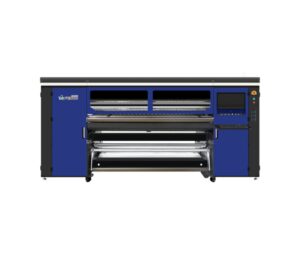
15 Epson I3200 printheads
- PRINTER 15 heads
- PRINTING SPEED 1 pass 610 m²/h
- PRINT WIDTH 1900 mm
- COMPATIBLE MEDIA Heat transfer paper
- COMPATIBILITY Win 7 (64 bit) / Win 10 (64 bit)
-
- Daily power-on (even if you don't print) Helps the inks circulate and prevents bubbles from forming or drying out in the heads.
- Automatic cleaning activated Let the equipment do its maintenance cycle. Do not interrupt it: it prolongs the life of the head.
- Keep the capping station, dampers, and wiper clean These consumables accumulate ink and lint. A weekly cleaning prevents stains and clogs.
- Control the ambient humidity Ideal: 45%–60%. Low humidity dries the ink; high humidity generates droplets on the paper.
- Check feed rollers and trays If they are dirty, they mark the paper or generate banding.
- Use the equipment at least 3–4 times per week Sublimation plotters need constant ink movement.
Max width: 1900mmSpeed: 610 m²/hMedia: Thermal Transfer PaperRequest a quote